
More actions
| IPhone 12 and Above WiFi IC Replacement & Activation | |
|---|---|
| Device | iPhone 12, iPhone 12 Mini, iPhone 12 Pro, iPhone 12 Pro Max, iPhone 13, iPhone 13 Mini, iPhone 13 Pro, iPhone 13 Pro Max, iPhone 14, iPhone 14 Plus, iPhone 14 Pro, iPhone 14 Pro Max, iPhone 15, iPhone 15 Plus, iPhone 15 Pro, iPhone 15 Pro Max, iPhone 16, iPhone 16 Plus, iPhone 16 Pro, iPhone 16 Pro Max |
| Affects part(s) | Main Logic Board, WiFi IC |
| Needs equipment | Soldering iron, Hot Air Station, JC Programmer, JC WiFi IC |
| Difficulty | ◉◉◉◉ Specialist |
| Type | Microsoldering"Microsoldering" is not in the list (Soldering, Teardown, Part replacement, Cleaning, Software, BGA, General) of allowed values for the "Repair Guide type" property. |
Problem description
On iPhone 12 and newer models, the Wi-Fi IC is paired (bound).
If the Wi-Fi IC fails, replacing it requires unbinding the pairing data from the NAND and activating a new programmable JC Wi-Fi IC using a JC Wi-Fi module for the V1SPRO.
Symptoms
- Wi-Fi toggle is greyed out (see fig. 1)
- Wi-Fi address shows "N/A" in Settings -> About
- Bluetooth toggle spins endlessly and never enables
Diagnostic Steps
- Confirm WiFi is not working in Settings -> About
- Measure surrounding caps/rails near WiFi IC to rule out short
- Check for broken WiFi interposer connections
- Confirm WiFi IC is faulty and needs replacement (see fig. 2)
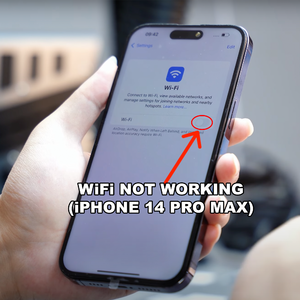
iPhone WiFi not working - 14 Pro Max (fig. 1) 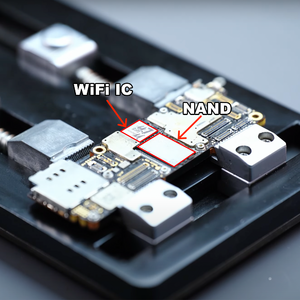
WiFi IC and NAND - iPhone 14 Pro Max (fig. 2)


Repair Steps
(We used an iPhone 14 Pro Max as an example)
- Locate and remove faulty WiFi IC (see fig. 2)
- Locate and remove the NAND (see fig. 2)
- Place the NAND in the JC programmer and run Query Code / Unbind (see fig. 3 & 4)
- Reball and re-install the NAND on the iPhone
- Power up the phone and connect it to the JC programmer (On models where the WiFi ic is on the lower board, you will need to power it up in an iSocket)
- Install a new programmable Wi-Fi IC in the programmer and run Activate Wi-Fi IC (see fig. 4 & 5)
- Once activation is successful, reball the new IC and re-install it on the logic board (see fig. 7)
- Power up the iPhone and verify that Wi-Fi functions are restored (see fig. 8)
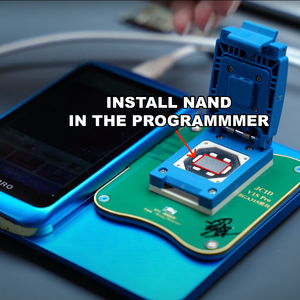
NAND installed in JC V1SPRO Programmer (fig. 3)


