
More actions
(samsung galaxy a33 5g no display repair guide) |
No edit summary |
||
| Line 1: | Line 1: | ||
{{Repair Guide | {{Repair Guide | ||
|Device= | |Device=Galaxy A33 5G | ||
|Affects parts= | |Affects parts=Logic Board | ||
|Needs equipment= | |Needs equipment=Soldering Iron, Hot Air Station, Microscope | ||
|Type= | |Type=Soldering, Teardown, BGA | ||
|Difficulty= | |Difficulty=3. Hard | ||
}} | }} | ||
{{stub}} | |||
== Problem description == | == Problem description == | ||
<!-- | <!-- | ||
Latest revision as of 01:05, 2 February 2026
| Galaxy A33 5G No Display | |
|---|---|
| Device | Galaxy A33 5G |
| Affects part(s) | Logic Board |
| Needs equipment | Soldering Iron, Hot Air Station, Microscope |
| Difficulty | ◉◉◉◌ Hard |
| Type | Soldering, Teardown, BGA |
This article is a stub. You can help Repair Wiki grow by expanding it
Problem description
Galaxy A33 screen does not respond at all. Displays no image, but there is a touch input on the entire panel. Replacing the screen does not fix the issue.
Symptoms
- No display(graphics) on screen
- Phone boots normally
- Touchscreen works
- Charges normally
Solution
The problem is due to a missing VDD_LCD_ELAVDD_7P6 signal.
Repair Steps

- Check GR on the connector (you will get a missing GR on a following pin)
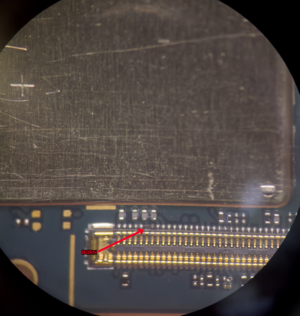
BURNED PIN - Check GR on the Capacitor where the area is burned, if GR is ok then proceed to do the jumper like in the following picture
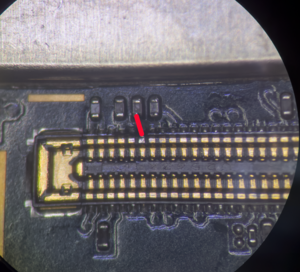
JUMPER - Test the display if it works
- If everything seems fine cover the jumper with UV oil.

